产品设计
架构设计
DBMind的监控平台以开源Prometheus为主,并提供了数据生产者exporter,可与Prometheus平台完成对接。DBMind服务架构如图1 DBMind服务架构所示:
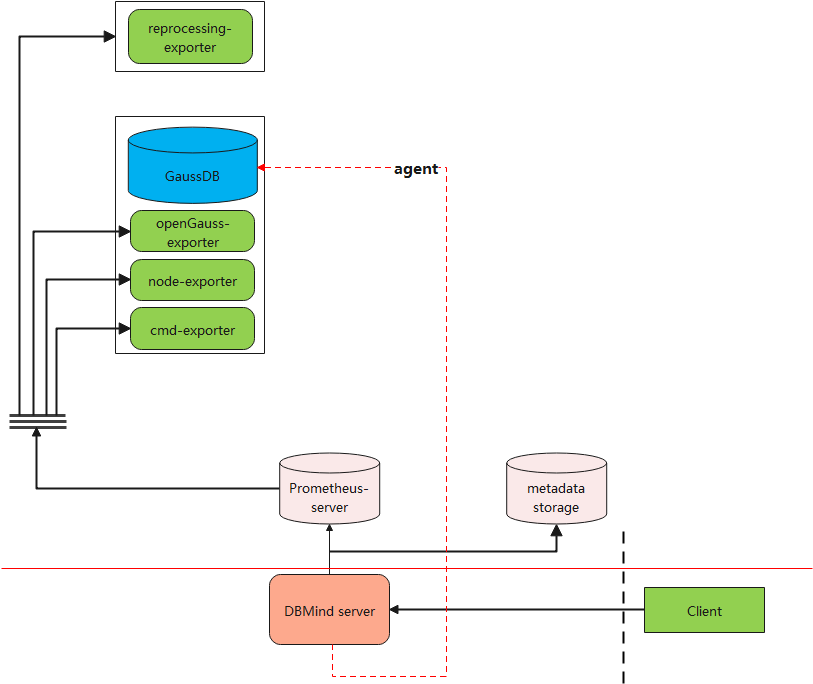
图中各关键组件说明:
- DBMind Service:DBMind后台服务,可用于定期离线计算,包括慢SQL根因分析、时序预测等;
- Prometheus-server:存储Prometheus监控指标的服务器;
- metadatabase:DBMind在离线计算结束后,将计算结果存储在此处,支持openGauss数据库;
- client:用户读取DBMind离线计算结果的客户端,目前该客户端支持命令行及Web API操作;
- opengauss-exporter:用户从openGauss数据库节点上采集监控指标,供DBMind服务进行计算,并作为Agent,在纳管的实例中执行SQL;
- node-exporter:Prometheus官方提供的exporter,可用于监控对应节点的系统指标,如CPU和内存使用情况;
- reprocessing-exporter:用于对Prometheus采集到的指标进行二次加工处理,例如计算CPU使用率等。
- cmd-exporter:用于采集命令行和日志指标。
安全设计
DBMind是openGauss数据库的自治组件,需要独立于数据库进行独立部署。在部署过程中,存在通信交互。对于交互的部分,可以采用SSL协议进行安全加固。
数据采集组件exporter的安全加固
exporter是用来采集数据库等指标信息的组件,DBMind自研的exporter组件包括openGauss-exporter和reprocessing-exporter。
上述exporter组件采用时序监控领域的事实标准Prometheus协议进行接口设计和实现。Prometheus的交互接口默认采用HTTP协议,并且可以通过SSL协议加固为HTTPS协议。DBMind的exporter默认支持的是HTTPS协议,需要用户手动指定SSL证书和密钥文件、CA文件等。
如果需要使用SSL协议,需要为下述命令行参数配置对应的证书文件:
表 1 exporter功能使用SSL协议需要配置的命令行参数
例如,用户可以通过如下命令行,来实现对reprocessing-exporter的配置:
gs_dbmind component reprocessing_exporter 127.0.0.1 9090 --web.listen-address 127.0.0.1 --web.listen-port 8181 --ssl-certfile /path/to/cert --ssl-keyfile /path/to/keyfile --ssl-ca-file /path/to/ca如果用户配置了SSL协议的CA证书,则会使用双向认证的形式,在Prometheus采集侧也应进行对应的证书文件配置,配置详情可以通过Prometheus官方网站获取详情。
获取时序数据过程的安全加固
DBMind Service也可以从Prometheus中获取时序数据,该通道也可以使用SSL协议进行加固。Prometheus默认是支持使用HTTPS协议的,关于Prometheus配置HTTPS协议的方式,可以参考Prometheus的官方网站。
在DBMind侧生成的配置文件目录中,手动修改dbmind.conf文件,配置其关于Prometheus数据采集的部分,设置该过程使用安全协议。例如:
[TSDB]
name = prometheus # The type of time-series database. Options: prometheus, influxdb.
host =  # Address of time-series database.
port =  # Port to connect to time-series database.
username = (null) # User name to connect to time-series database.
password = (null) # Password to connect to time-series database.
ssl_certfile = (null) # The certificate file for ssl connections.
ssl_keyfile = (null) # Certificate private key file.
ssl_keyfile_password = (null) # Password for ssl keyfile.
ssl_ca_file = (null)  # CA certificate to validate requests.
可以通过修改上述配置文件中的ssl_certfile、ssl_keyfile、ssl_keyfile_password以及ssl_ca_file选项的值,来对应配置SSL证书文件、SSL密钥文件、SSL密钥文件密码以及CA证书文件
DBMind服务安全加固
DBMind Service通过RestfulAPI接口对外提供服务,默认支持HTTPS协议,用户在配置文件目录中手动修改dbmind.conf文件,配置关于WEB-SERVICE部分,设置该过程使用安全协议。其中当SSL为true时需要用户配置SSL证书路径;SSL为false时如果没有配置SSL证书路径则使用HTTP协议并进行风险提示;如果SSL为false时配置了证书路径,则优先使用HTTPS协议,例如:
[WEB-SERVICE]
ssl = true # Using secure protocol by default, users must provide a certificate path. Otherwise, the DBMind process cannot start.
host = 127.0.0.1  # Which host to bind for web service. '0.0.0.0' means to bind all.
port = 8080  # Port to listen for web serivce.
ssl_certfile = (null) # The certificate file for ssl connections.
ssl_keyfile = (null) # Certificate private key file.
ssl_keyfile_password = (null) # Password for ssl keyfile.
ssl_ca_file = (null)  # CA certificate to validate requests.