Deploying Dify with openGauss
Dify is an open-source large language model (LLM) application development platform. With the retrieval-augmented generation (RAG) engine, it can orchestrate LLM applications ranging from agents to complex AI workflows. This document focuses on how to deploy Dify and use the openGauss DataVec vector database as the corpus for the RAG engine.
Dify Deployment
Obtain Dify Source Code
Visit https://github.com/langgenius/dify/archive/refs/tags/1.1.0.zip to obtain the Dify 1.1.0 source code. (Dify has supported openGauss since version 1.1.0. This document uses Dify 1.1.0 as an example.)
Configure Parameters
Create a directory and extract the archive:
mkdir /usr/local/dify
unzip 1.1.0.zip -d /usr/local/dify/
cd /usr/local/dify/dify-1.1.0/docker
Configure environment variables by setting VECTOR_STORE=opengauss in .env
cp .env.example .env
vim .env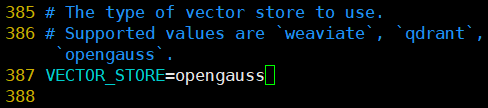
Start the Container
Run the following command to automatically pull the corresponding Docker image and start the service.
docker-compose up -dAfter the container starts, run docker ps to ensure that all services are running properly, as shown in the following figure: 
AI Service Integration
Create a User and Log In
Access the locally deployed Dify web service page:
http://your_server_ip