MOT Deployment
MOT Server Optimization – x86
Generally, databases are bounded by the following components –
- CPU – A faster CPU speeds up any CPU-bound database.
- Disk – High-speed SSD/NVME speeds up any I/O-bound database.
- Network – A faster network speeds up any SQL\Net-bound database.
In addition to the above, the following general-purpose server settings are used by default and may significantly affect a database's performance.
MOT performance tuning is a crucial step for ensuring fast application functionality and data retrieval. MOT can utilize state-of-the-art hardware, and therefore it is extremely important to tune each system in order to achieve maximum throughput.
The following are optional settings for optimizing MOT database performance running on an Intel x86 server. These settings are optimal for high throughput workloads –
BIOS
Hyper Threading – ON
Activation (HT=ON) is highly recommended.
We recommend turning hyper threading ON while running OLTP workloads on MOT. When hyper‑threading is used, some OLTP workloads demonstrate performance gains of up to40%.
OS Environment Settings
NUMA
Disable NUMA balancing, as described below. MOT performs its own memory management with extremely efficient NUMA-awareness, much more than the default methods used by the operating system.
echo 0 > /proc/sys/kernel/numa_balancingServices
Disable Services, as described below –
service irqbalance stop           # MANADATORY
service sysmonitor stop           # OPTIONAL, performance
service rsyslog stop       # OPTIONAL, performance
Tuned Service
The following section is mandatory.
The server must run the throughput-performance profile –
[...]$ tuned-adm profile throughput-performanceThe throughput-performance profile is broadly applicable tuning that provides excellent performance across a variety of common server workloads.
Other less suitable profiles for openGauss and MOT server that may affect MOT's overall performance are – balanced, desktop, latency-performance, network-latency, network-throughput and powersave.
Sysctl
The following lists the recommended operating system settings for best performance.
Add the following settings to /etc/sysctl.conf and run sysctl -p
net.ipv4.ip_local_port_range = 9000 65535
kernel.sysrq = 1
kernel.panic_on_oops = 1
kernel.panic = 5
kernel.hung_task_timeout_secs = 3600
kernel.hung_task_panic = 1
vm.oom_dump_tasks = 1
kernel.softlockup_panic = 1
fs.file-max = 640000
kernel.msgmnb = 7000000
kernel.sched_min_granularity_ns = 10000000
kernel.sched_wakeup_granularity_ns = 15000000
kernel.numa_balancing=0
vm.max_map_count = 1048576
net.ipv4.tcp_max_tw_buckets = 10000
net.ipv4.tcp_tw_reuse = 1
net.ipv4.tcp_tw_recycle = 1
net.ipv4.tcp_keepalive_time = 30
net.ipv4.tcp_keepalive_probes = 9
net.ipv4.tcp_keepalive_intvl = 30
net.ipv4.tcp_retries2 = 80
kernel.sem = 250 6400000 1000 25600
net.core.wmem_max = 21299200
net.core.rmem_max = 21299200
net.core.wmem_default = 21299200
net.core.rmem_default = 21299200
#net.sctp.sctp_mem = 94500000 915000000 927000000
#net.sctp.sctp_rmem = 8192 250000 16777216
#net.sctp.sctp_wmem = 8192 250000 16777216
net.ipv4.tcp_rmem = 8192 250000 16777216
net.ipv4.tcp_wmem = 8192 250000 16777216
net.core.somaxconn = 65535
vm.min_free_kbytes = 26351629
net.core.netdev_max_backlog = 65535
net.ipv4.tcp_max_syn_backlog = 65535
#net.sctp.addip_enable = 0
net.ipv4.tcp_syncookies = 1
vm.overcommit_memory = 0
net.ipv4.tcp_retries1 = 5
net.ipv4.tcp_syn_retries = 5
Update the section of /etc/security/limits.conf to the following –
<user> soft nofile 100000
<user> hard nofile 100000
The soft and a hard limit settings specify the quantity of files that a process may have opened at once. The soft limit may be changed by each process running these limits up to the hard limit value.
Disk/SSD
The following describes how to ensure that disk R/W performance is suitable for database synchronous commit mode.
To do so, test your disk bandwidth using the following
[...]$ sync; dd if=/dev/zero of=testfile bs=1M count=1024; sync
1024+0 records in
1024+0 records out
1073741824 bytes (1.1 GB) copied, 1.36034 s, 789 MB/s
In case the disk bandwidth is significantly below the above number (789 MB/s), it may create a performance bottleneck for openGauss, and especially for MOT.
Network
Use a 10Gbps network or higher.
To verify, use iperf, as follows –
Server side: iperf -s
Client side: iperf -c <IP>
rc.local – Network Card Tuning
The following optional settings have a significant effect on performance –
Copy set_irq_affinity.sh from https://gist.github.com/SaveTheRbtz/8875474 to /var/scripts/.
Put in /etc/rc.d/rc.local and run chmod in order to ensure that the following script is executed during boot –
'chmod +x /etc/rc.d/rc.local'
var/scripts/set_irq_affinity.sh -x all <DEVNAME>
ethtool -K <DEVNAME> gro off
ethtool -C <DEVNAME> adaptive-rx on adaptive-tx on
Replace <DEVNAME> with the network card, i.e. ens5f1
MOT Server Optimization – ARM Huawei Taishan 2P/4P
The following are optional settings for optimizing MOT database performance running on an ARM/Kunpeng-based Huawei Taishan 2280 v2 server powered by 2-sockets with a total of 128 Cores and Taishan 2480 v2 server powered by 4-sockets with a total of 256 Cores.
Unless indicated otherwise, the following settings are for both client and server machines –
BIOS
Modify related BIOS settings, as follows –
Select BIOS -- Advanced -- MISC Config. Set Support Smmu to Disabled.
Select BIOS -- Advanced -- MISC Config. Set CPU Prefetching Configuration to Disabled.
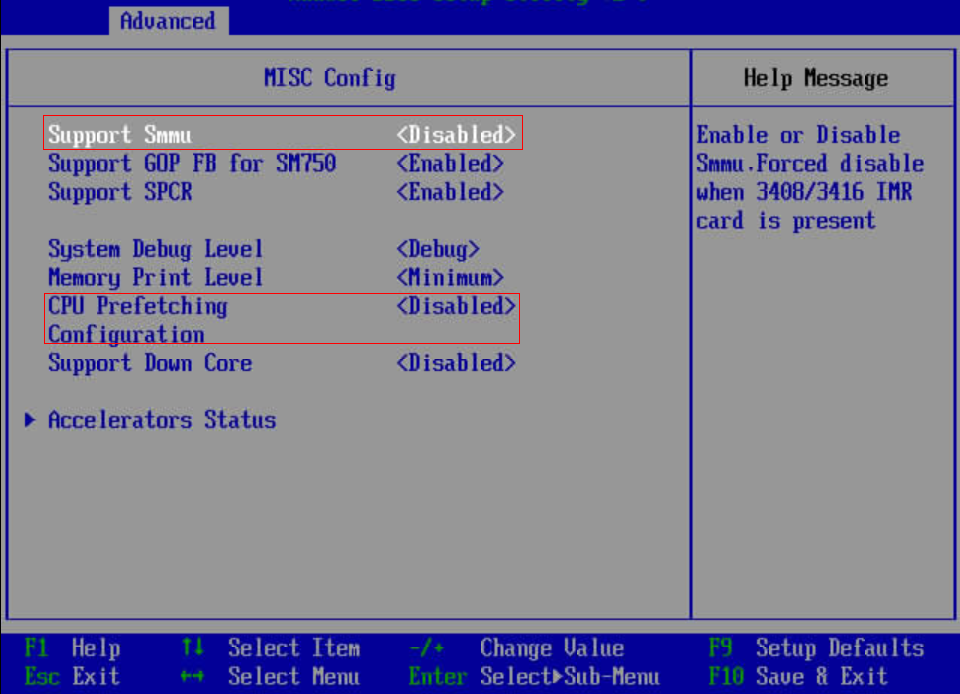
Select BIOS -- Advanced -- Memory Config. Set Die Interleaving to Disabled.

Select BIOS -- Advanced -- Performance Config. Set Power Policy to Performance.

OS – Kernel and Boot
The following operating system kernel and boot parameters are usually configured by a sysadmin.
Configure the kernel parameters, as follows –
net.ipv4.ip_local_port_range = 9000 65535
kernel.sysrq = 1
kernel.panic_on_oops = 1
kernel.panic = 5
kernel.hung_task_timeout_secs = 3600
kernel.hung_task_panic = 1
vm.oom_dump_tasks = 1
kernel.softlockup_panic = 1
fs.file-max = 640000
kernel.msgmnb = 7000000
kernel.sched_min_granularity_ns = 10000000
kernel.sched_wakeup_granularity_ns = 15000000
kernel.numa_balancing=0
vm.max_map_count = 1048576
net.ipv4.tcp_max_tw_buckets = 10000
net.ipv4.tcp_tw_reuse = 1
net.ipv4.tcp_tw_recycle = 1
net.ipv4.tcp_keepalive_time = 30
net.ipv4.tcp_keepalive_probes = 9
net.ipv4.tcp_keepalive_intvl = 30
net.ipv4.tcp_retries2 = 80
kernel.sem = 32000 1024000000      500     32000
kernel.shmall = 52805669
kernel.shmmax = 18446744073692774399
sys.fs.file-max = 6536438
net.core.wmem_max = 21299200
net.core.rmem_max = 21299200
net.core.wmem_default = 21299200
net.core.rmem_default = 21299200
net.ipv4.tcp_rmem = 8192 250000 16777216
net.ipv4.tcp_wmem = 8192 250000 16777216
net.core.somaxconn = 65535
vm.min_free_kbytes = 5270325
net.core.netdev_max_backlog = 65535
net.ipv4.tcp_max_syn_backlog = 65535
net.ipv4.tcp_syncookies = 1
vm.overcommit_memory = 0
net.ipv4.tcp_retries1 = 5
net.ipv4.tcp_syn_retries = 5
##NEW
kernel.sched_autogroup_enabled=0
kernel.sched_min_granularity_ns=2000000
kernel.sched_latency_ns=10000000
kernel.sched_wakeup_granularity_ns=5000000
kernel.sched_migration_cost_ns=500000
vm.dirty_background_bytes=33554432
kernel.shmmax=21474836480
net.ipv4.tcp_timestamps = 0
net.ipv6.conf.all.disable_ipv6=1
net.ipv6.conf.default.disable_ipv6=1
net.ipv4.tcp_keepalive_time=600
net.ipv4.tcp_keepalive_probes=3
kernel.core_uses_pid=1
Tuned Service
The following section is mandatory.
The server must run a throughput-performance profile –
[...]$ tuned-adm profile throughput-performanceThe throughput-performance profile is broadly applicable tuning that provides excellent performance across a variety of common server workloads.
Other less suitable profiles for openGauss and MOT server that may affect MOT's overall performance are – balanced, desktop, latency-performance, network-latency, network-throughput and powersave.
Boot Tuning
Add iommu.passthrough=1 to the kernel boot arguments.
When operating in pass-through mode, the adapter does require DMA translation to the memory, which improves performance.